

To start using ConnectPay’s Card top-up to your customer’s accounts, follow these steps:
- Initiate a card top-up payment API request to baas/merchant/topup/ following the example below from our API reference: Initiate Card Top up API
redirectUrlin Initiate Card Top up API should be whitelisted in your devApp in callbackUrls.- Use your customer’s IBAN account number in
accountNumber. - If the request was successful, you will receive a response with HTTP code
201andpaymentIdandredirectUrlin the response body. You have to redirect your customer toredirectUrlto add card number and authorize a payment within their Issuer. SavepaymentIdfor further status check. Response example below:
{
  "merchant": {
    "generic1": "0bf1e34e",
    "generic2": "0bf1e34e",
    "generic3": "0bf1e34e"
  },
  "payment": {
    "paymentId": "8c36b04b-fd6e-4442-b837-a3dcafcfc5ff",
    "redirectUrl": "https://pay.connectpay.com?key=8c36b04b-fd6e-4442-b837-a3dcafcfc5ff"
  }
}- After your consumer is done with payment journey (authorizes a payment at Issuer), we will redirect consumer to our result page (Failed, In progress or Success) from which we have auto-redirection to your environment. We redirect consumers to your
redirectUrlprovided in Initiate Card Top up API request. All transactions require 3DS authorization. Exemptions might be applied by the Consumer’s Issuer. - Sometimes, card schemes or Issuer may not respond immediately with the final payment status information. In such cases, we will periodically check at Provider for final status and update payment information. Same way, you should periodically check payment status using Get payment details API . Or you can subscribe to our payment status notification events and wait for status change notification.
For testing only. When testing requests in the stage environment, you can use such card numbers:
1. 4242424242424242 – Visa, credit card, success response, 3DS challenge enabled
2. 5436031030606378 – MasterCard, credit card, success response, 3DS challenge enabled
3. 4485040371536584 – Visa, credit card, success response, 3DS frictionless response
4. 4544249167673670 – Visa, credit card, failure response, Insufficient funds
5. 4539253655711767 – Visa, credit card, failure response, Stolen card
6. If you send us amount 99.00 EUR, it will return status PendingProvider, meaning it got stopped for manual review. In non-prod environment such transactions are not approved, unless you contact us.
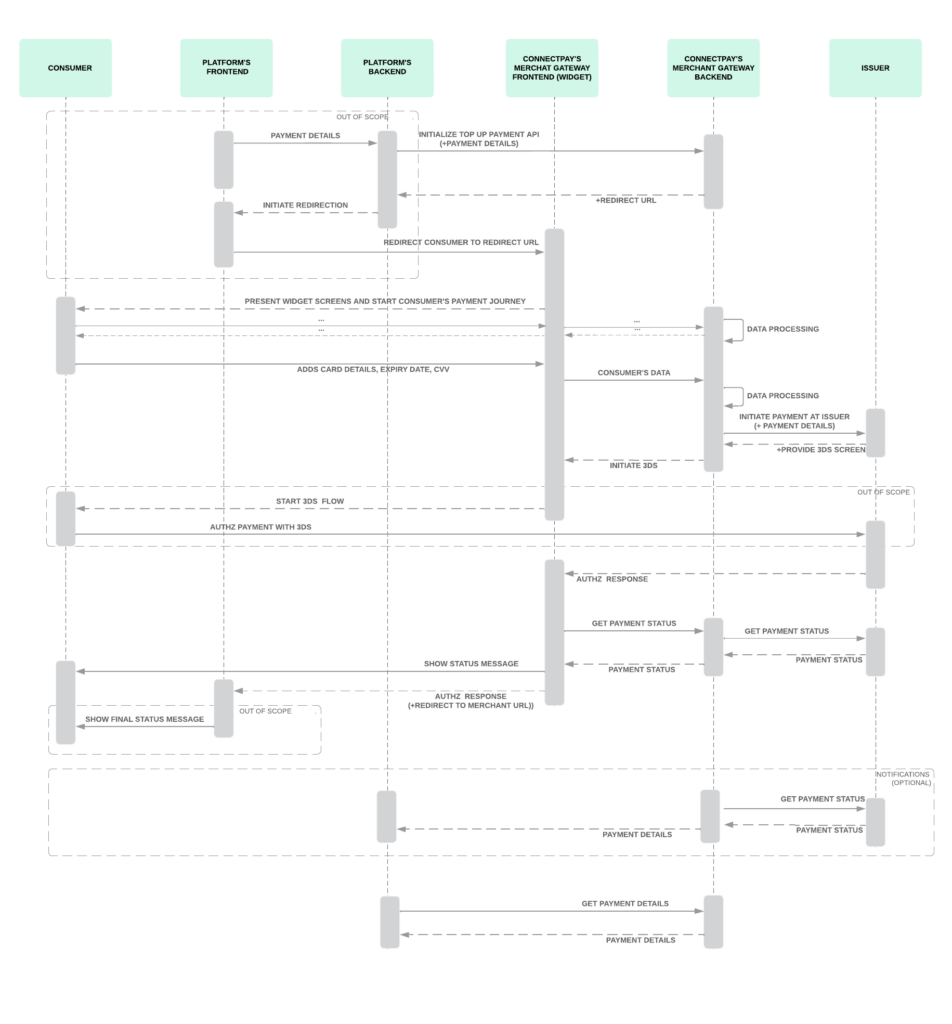
You can see full sequence diagram below:
- When sending the
accountNumber., make sure it’s active and belongs to the consumer you’ve onboarded; - If success response received from Issuer / Card schemes, top up transactions are settled instantly to consumer’s IBAN account. For manually stopped transactions a review will be performed before settlement.
- ConnectPay does not charge any fees from your consumer during this flow.
Limits
Limits are applied for card transactions (per end-user):
- MIN transaction amount 10 EUR
- MAX transaction amount 10 000 EUR
- Daily limit 10 000 EUR
- Monthly limit 500 000 EUR