

What is Strong Customer Authentication?
Strong Customer Authentication (further – SCA) is a requirement of the EU Revised Directive on Payment Services (PSD2) on payment service providers within the European Economic Area and UK. The requirement ensures that electronic payments are performed with multi-factor authentication, to increase the security of electronic payments.
As a licensed Electronic Money Institution, ConnectPay must ensure that BaaS partners would implement SCA for required events. There are a lot of SCA factors examples in the market; the most important thing is to use at least 2 of 3 independently (compromise of one should not undermine the reliability of the other components) :
- Knowledge – Something the customer knows (e.g. password, mobile PIN, passphrase, memorized swiping path).
- Possession – Something the customer has (e.g. a trusted device, signature token, QR code, One Time Password (OTP)).
- Inherence – Something the customer is (e.g. face ID, fingerprint).
SCA must be designed in such a way as to protect the confidentiality of the authentication data.
Note! Various authenticators (MS authenticator, Google authenticator etc) are not sufficient as SCA factor as they don’t comply with dynamic linking requirements.
When is SCA required?
- Accessing payment accounts. Anytime a user logs in online to view their payment account details.
- Initiating transactions. Whenever a user starts an electronic payment process.
- Remote risk-prone actions. For any activity conducted remotely, that could potentially lead to payment fraud or similar security threats. E.g.: change card PIN, confirm application data, order a card.
SCA Events
Certain workflows (events) undertaken by a user will require them to confirm it with SCA, typically applying to the following event types:
Customer related events
- Log in to the platform.
- Change of customer contact information – phone number, address, email address, etc.
- Recover password, change password (recommendation, might become mandatory based on partner’s volume and clients)
- Change SCA related credentials.
Document signing events
- Signing onboarding application.
- Signing card application.
- Opening a new account.
- Confirming ODD application.
Payment events
- Authorization of a payment.
- Authorization of currency exchange.
Card related events
- Activate a card.
- Changing card PIN.
- Update card security settings.
- Unfreeze a card.
Important! When logged in your platform, user must be logged out after 5 min if they are inactive. Sessions must be short-lived. Exemptions up to 15 min might be applied to onboarding journey while wallet is not yet created.
Blocking access
It is very important to prevent unauthorized access by blocking user after max 5 incorrect attempts to login/confirm any kind of operation. Unblocking process is up to you, but it shall require identifying a user so that it would be clear which person tried to login.
Dynamic linking
All SCA authorization events require an “authentication code” that should be unique to each authorization event.
In essence, Dynamic Linking requirements can be summarized as: Authorization requests must be:
- Linked to the specific amount (in case of payments)
- Linked to the specific payee (in case of payments)
- Invalid if either of the above changes
- Unforgeable
- Non-reusable
- Time-limited
Additionally, both the amount and recipient have to be made clear to the payer when authenticating the payment. If the authentication code or any payment details are changed, the transaction should fail. When initiated (presented to EndUser to perform SCA activity), each authorization operation must be time bound and should be rejected if time limit was reached.
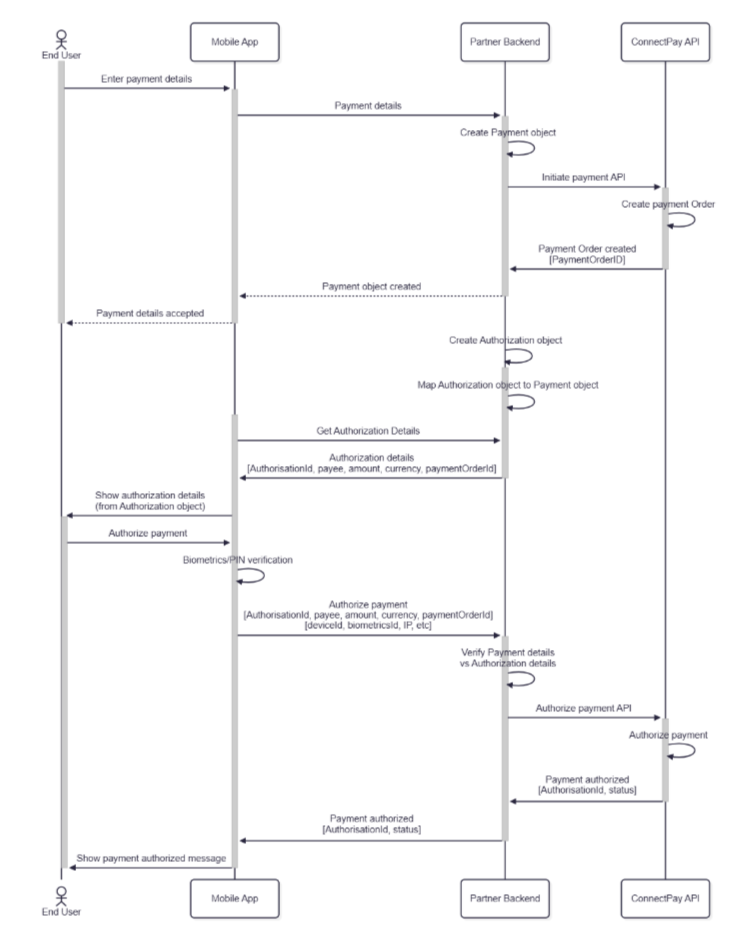
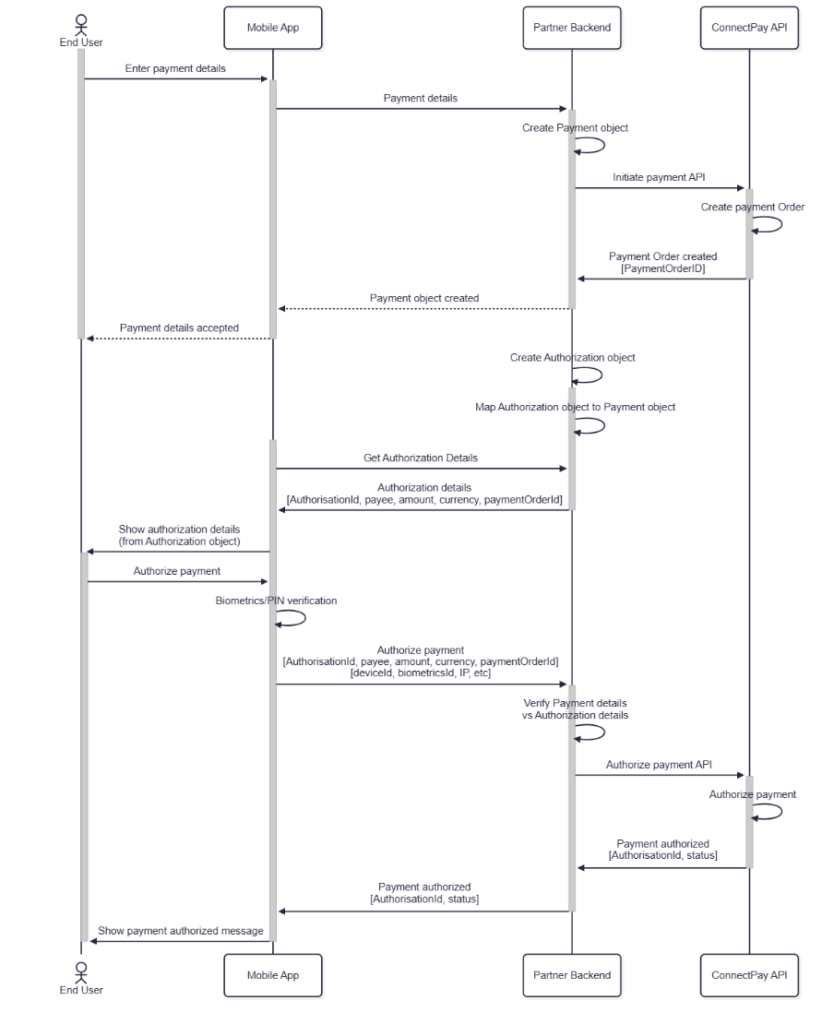
It is not sufficient to rely on IDs only, when authorizing payment. Authorization object must be linked to payment, and contain all necessary payment details. It is not enough to link authorization object to payment object – payment details should be an integral part of the authorization object itself.
When authorized by EndUser in the App, End User must be present with payment details from the Authorization object, not from the Payment object.
Authorization response must be sent to backend and verified there against payment details.
Presenting payment details from authorization object to End User ensures that correct information was shown. And verification of payment details in the backend ensures that no modifications were made.
In a picture below we provide high-level flow how this could be implemented. It might be that you will select to use some third party providers for SCA auth, this part is not reflected in the flow.
App integrity check
For partners that implement SCA embedded in mobile app, there are few additional requirements regarding app integrity. This protection helps to reduce the risk of application code or runtime memory hacking – from sending legitime looking requests from compromised app to the backend.
Mobile App at least should have:
- Jailbreak detection
- Root detection
- Emulator detection
- Debugger detection
If device integrity is compromised, at least, SCA operations should be blocked. Ideally – application should not let user to login and perform any activities.
Security Logging for SCA Events
Partners using SCA in their integration must log all relevant authentication and security events and be able to provide these logs to ConnectPay upon request.
To provide the information required for an audit, the system must log all important events.
The recommended approach is to use application logs that contain enough detail to reconstruct what happened and in what order. Application logs are usually harder to tamper with, which makes them better suited for audit purposes.
However, this is a recommendation, not a strict requirement. Storing the same information in the database is also acceptable, as long as it is complete, reliable, and can be used to reconstruct the relevant events.
Required log events include:
- successful authentication attempts
- unsuccessful authentication attempts
- use of second-factor authentication (2FA / SCA)
- unsuccessful attempts to access restricted resources
Each SCA event log must contain:
- End user IP address
- End user User-Agent, when a web app is used
- End user geolocation, if available
- User who authorized the event
- Time when the SCA event was created by the system
- Time when the SCA event was authorized by the end user
- Message shown to the user
- Dynamic linking ID
- SCA factor used
- Type of event being authorized
- Link to particular ConnectPay API response reference (applicationId, paymentOrder etc)
These requirements may apply depending on the intermediary setup and integration flow, and may be reviewed during pre-launch and periodic oversight checks.
SCA logs must be saved for 13 months from the creation date.